
Real-Time Stock Market Data for Cursor如何为 Cursor 接入实时股票市场数据
Build reliable real-time stock data workflows for Cursor with verified timestamps, market coverage, freshness, and failure handling.
围绕时间戳、市场覆盖、数据时效和故障处理,为 Cursor 构建可靠的实时股票数据工作流。
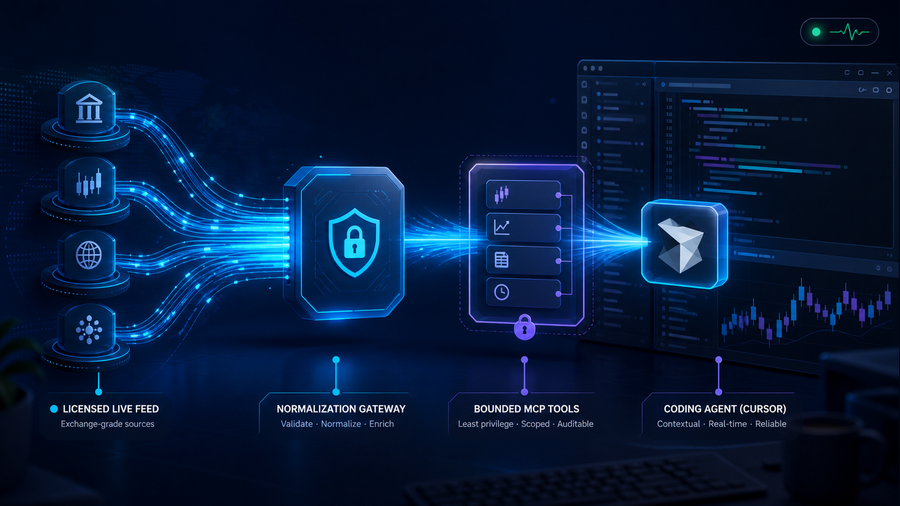
The short answer: connect Cursor to bounded market-data tools
Cursor can write and inspect code, but its model knowledge is not a live exchange feed. To use real-time stock market data for Cursor, consume a licensed provider stream in an application-side service, normalize and cache the latest state, then expose only the queries the coding agent needs through Model Context Protocol (MCP).
Cursor’s official MCP documentation supports custom servers configured in .cursor/mcp.json for a project or ~/.cursor/mcp.json globally. Cursor Agent can use the same configuration. That makes MCP the practical connection layer—but the market-data gateway, entitlements, validation, and audit trail remain your responsibility.
Architecture: stream continuously, ask selectively
Do not pour an infinite tick stream into model context. Alpaca’s real-time stock data documentation describes WebSocket streaming as more accurate and efficient for current prices than polling historical endpoints. Let the gateway own connections, subscriptions, ordering, reconnects, and backpressure. Cursor receives a small evidence envelope only when a task requires it.
Licensed quotes, trades, and bars arrive over the provider’s supported interface.
Authenticate, validate, timestamp, normalize, deduplicate, and cache bounded state.
Expose narrow tools such as quote, bars, market status, and recent alert evidence.
Call tools, inspect evidence, implement code, and show provenance.
Define “real time” as a data contract
A price without provenance is difficult to trust. Every result should state the instrument, value type, market event time, gateway receipt time, provider and feed, session, and delay state. Preserve provider timestamps instead of replacing them with the tool-call time.
{
  "symbol": "AAPL",
  "kind": "quote",
  "bid": 0,
  "ask": 0,
  "event_time": "provider timestamp",
  "received_at": "gateway timestamp",
  "feed": "provider/feed identity",
  "session": "regular | extended | closed",
  "freshness": "live | delayed | stale",
  "is_example": true
}
The values above are schema placeholders, not a current quote. A production tool should define maximum age per operation, reject stale evidence when the caller requires live data, and return typed states instead of guessing.
Implementation: from one quote to a reliable Cursor workflow
1. Specify the workload before the provider
Write down exchange coverage, quote versus trade data, acceptable delay, update rate, sessions, historical depth, display rights, and symbol count. An internal prototype and a customer-facing redistributed product require different entitlements.
2. Build a server-side market-data gateway
Store the provider credential outside source control and Cursor prompts. The gateway owns the WebSocket, reconnect policy, validation, bounded cache, and provider-specific schema. Use a read-only market-data credential, separate from brokerage access.
3. Publish narrow MCP operations
Start with get_quote(symbol), get_bars(symbol,timeframe,limit), and get_market_status(exchange). Limit symbol arrays, date ranges, response size, and execution time. Avoid a generic HTTP proxy, which expands the agent’s authority and weakens auditability.
4. Register the server in Cursor
For a project-scoped local server, add a reviewed configuration to .cursor/mcp.json. Cursor’s docs also support global configuration and remote servers. Do not commit literal secrets; inject them from a local secret mechanism appropriate to your environment.
{
  "mcpServers": {
    "market-data": {
      "command": "node",
      "args": ["./tools/market-data-mcp/server.js"]
    }
  }
}
5. Inspect tools before trusting prompts
Confirm the server exposes only expected operations. Cursor Agent CLI documents cursor-agent mcp list and cursor-agent mcp list-tools market-data for checking configured servers and tool arguments. Review every returned field and error path.
6. Write a provenance rule for the agent
Require Cursor to display symbol, measurement type, source, event time, session, and freshness beside a price; to say “unavailable” when checks fail; and to separate observed data from interpretation. Fresh market evidence does not make generated analysis investment advice.
Controls that matter before production
| Control | Failure it prevents | Practical rule |
|---|---|---|
| Entitlements | Calling delayed or partial coverage “live” | Return feed identity and delay class on every response. |
| Least privilege | Agent reaches trading or arbitrary URLs | Market reads only; no order endpoint or generic proxy. |
| Freshness | Cached values silently appear current | Define maximum age and expose live/delayed/stale. |
| Auditability | A result cannot be reproduced | Log operation, symbols, feed, timestamps, latency, and status—not secrets. |
| Redistribution | Prototype licensing is assumed to cover customers | Confirm display and redistribution terms with the selected provider. |
Use QVeris provider discovery to narrow provider options, then verify coverage, entitlements, pricing, and redistribution in the provider’s current official documentation. Use QVeris tool discovery to inspect the smallest operation that fits your workload.
Validate the ugly states, not only a live demo
A successful quote during market hours proves only connectivity. Save sanitized, timestamped fixtures and test the states the product must explain.
- Pre-market, regular, after-hours, closed, and halted sessions render distinctly.
- Reconnects neither duplicate events nor move timestamps backward.
- Delayed and stale data never silently appear live.
- Unknown symbols, rate limits, malformed payloads, and partial outages return typed errors.
- MCP responses remain bounded under broad prompts and large symbol requests.
- The core suite works from fixtures while the market is closed; live smoke tests are opt-in.
Four useful patterns inside Cursor
Implement a live dashboard adapter
Generate a provider-neutral interface with loading, delayed, stale, closed, and disconnected UI states.
Explain a price discrepancy
Compare event time, venue, quote versus trade, session, adjustment policy, and feed entitlement before editing code.
Create deterministic fixtures
Ask Cursor to turn sanitized evidence envelopes into fixtures for component, reconnect, and stale-state tests.
Prototype a read-only alert
Evaluate rules in the gateway and expose recent triggers without exposing brokerage credentials or execution.
Frequently asked questions
Can Cursor access real-time stock prices by itself?
Not as an inherent model capability. Connect a licensed source through a controlled tool such as an MCP Server and return timestamps, provenance, and freshness with every result.
Should Cursor consume a WebSocket directly?
Usually no. Let an application service own the stream and expose bounded snapshots. This keeps reconnection, ordering, backpressure, and context size outside the agent loop.
Where should I configure the MCP server?
Use .cursor/mcp.json for tools scoped to a reviewed project and the global configuration only for tools you intentionally trust across projects. Keep secrets out of committed configuration.
Does live data make Cursor’s analysis correct?
No. Freshness solves one evidence problem. Coverage, venues, corporate actions, data quality, calculations, prompts, licensing, and interpretation still require validation and human judgment.
How do I test when the market is closed?
Use timestamped fixtures for normal, delayed, stale, halted, rate-limited, and disconnected states. Keep a small opt-in live smoke test for connectivity.
Start with one symbol and one read-only tool
Prove freshness, provenance, degraded states, and permission boundaries before expanding symbol coverage or adding analysis. The smallest trustworthy workflow is the strongest foundation.